
Have you ever applied for dozens of jobs and wondered why you never received a single interview call?
You're qualified. You have the right experience. Yet, your applications seem to disappear into a black hole.
The truth is, your resume might not even be reaching the recruiter.
Before a hiring manager reads your resume, it often passes through an Applicant Tracking System (ATS)—software used by companies to filter and organize job applications. If your resume isn't ATS-friendly, it could be rejected automatically, even if you're the perfect candidate.
The good news? Creating an ATS-friendly résumé isn't difficult. With the right format and content, you can significantly improve your chances of getting shortlisted.
Let's explore how.
What Is an ATS?
An Applicant Tracking System (ATS) is software that helps employers manage large numbers of job applications.
Instead of manually reviewing hundreds of resumes, recruiters use ATS software to scan resumes for keywords, qualifications, skills, and work experience.
If your resume matches the job requirements, it will be added to the recruiter's shortlist. If not, it may never be seen by a human.
That's why optimizing your resume for ATS is no longer optional—it's essential.
Why ATS-Friendly Resumes Matter
Imagine applying for your dream job.
You carefully prepare your resume, click "Apply", and wait.
Days turn into weeks, but nothing happens.
It doesn't always mean you're unqualified.
Sometimes your resume simply couldn't be understood by the ATS because of poor formatting, missing keywords, or unnecessary graphics.
An ATS-friendly resume ensures your qualifications are properly recognised, giving you a better chance of reaching the interview stage.
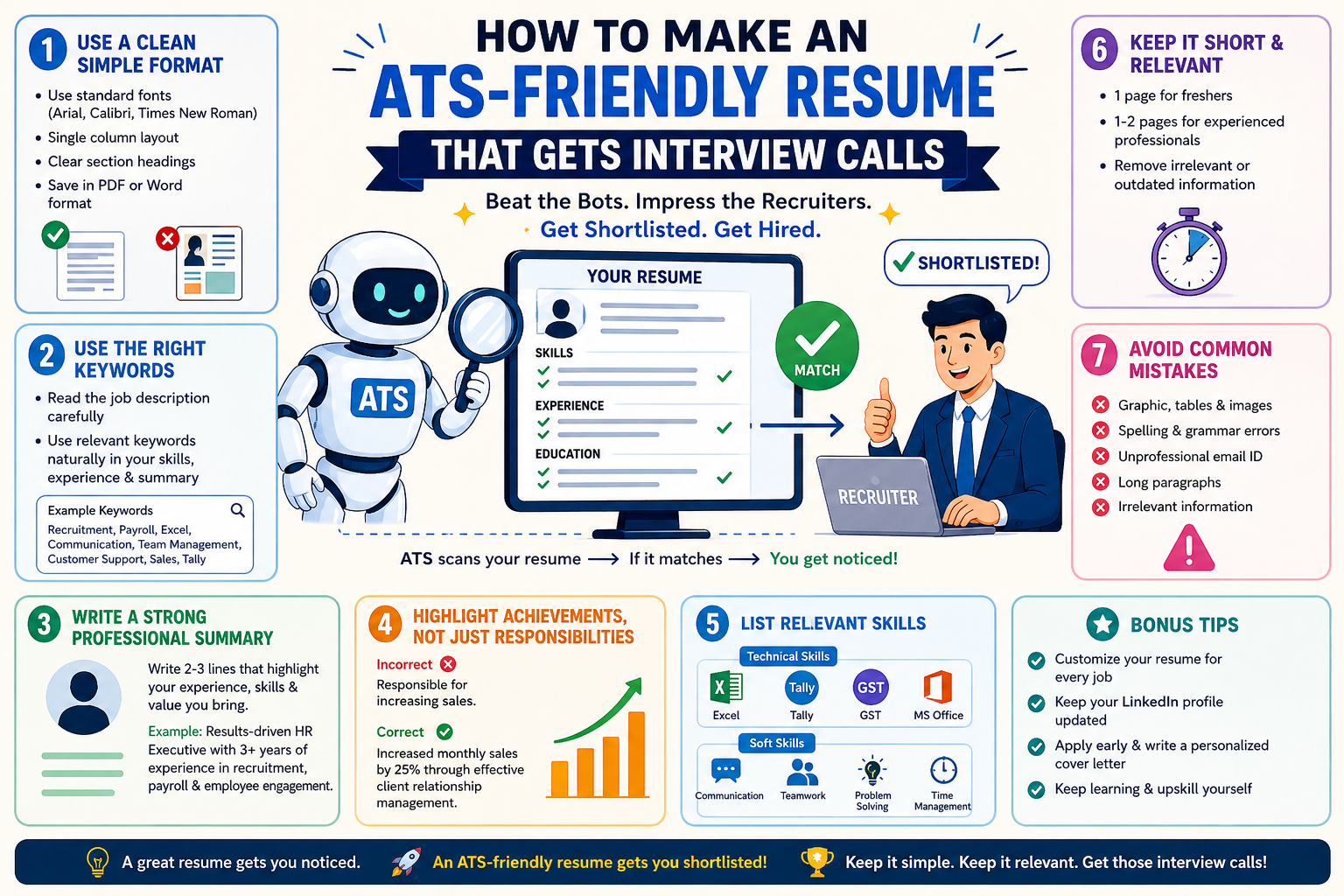
Start with a simple resume format.
Many candidates try to make their resumes look visually impressive by adding tables, icons, graphics, colourful designs, and multiple columns.
While these may look attractive, ATS software often struggles to read them.
Instead:
Remember, simplicity often works better than creativity when applying online.
Use the Right Keywords
Keywords are one of the biggest factors ATS software looks for.
Before applying, carefully read the job description.
Notice words like:
If these skills genuinely match your experience, include them naturally throughout your résumé.
Avoid stuffing keywords just to beat the system. Recruiters can easily recognise when skills don't match your actual experience.
Write a Strong Professional Summary
The top section of your resume should immediately tell recruiters who you are.
Instead of writing:
"Looking for a challenging opportunity."
Write something more specific:
"Results-driven HR executive with 3 years of experience in recruitment, payroll, employee engagement, and statutory compliance. Passionate about building high-performing teams and improving HR processes."
A concise summary creates a strong first impression.
Highlight Your Achievements, Not Just Responsibilities
Many resumes simply list daily tasks.
For example:
❌ Responsible for sales.
A stronger approach would be the following:
✅ Increased monthly sales by 25% through effective client relationship management.
Numbers make your achievements more believable and impactful.
Whenever possible, include measurable results.
Include Relevant Skills
Recruiters often scan the skills section first.
Some commonly searched skills include:
Technical Skills
Soft Skills
Choose skills that genuinely reflect your abilities.
Customise Your Resume for Every Job
One of the biggest mistakes candidates make is using the same resume for every application.
Different jobs require different skills.
If you're applying for an HR role, emphasise recruitment, payroll, onboarding, and compliance.
If you're applying for sales, highlight target achievement, customer relationship management, negotiation, and lead generation.
Small changes can dramatically improve your chances.
Keep It Short and Relevant
Recruiters spend only a few seconds reviewing each resume.
Aim for:
Remove outdated certifications, irrelevant internships, and unnecessary personal information.
Every line should add value.
Common Resume Mistakes to Avoid
Many candidates unknowingly make simple mistakes that reduce their chances of getting shortlisted.
Avoid:
Before submitting, proofread your resume carefully.
Even small mistakes can create a negative impression.
ATS Resume Checklist
Before clicking "Apply", ask yourself:
✔ Is my resume easy to read?
✔ Does it include keywords from the job description?
✔ Have I highlighted achievements instead of only responsibilities?
✔ Are my contact details correct?
✔ Is the formatting simple and professional?
✔ Have I checked for spelling mistakes?
If the answer is yes, you're ready to apply.
Bonus Tips to Get More Interview Calls
Your resume is only one part of the hiring process.
To improve your chances even further:
The stronger your overall profile, the more attractive you become to employers.
Final Thoughts
A great resume doesn't just tell employers where you've worked—it tells them why they should hire you.
An ATS-friendly resume ensures your qualifications are recognised by both technology and recruiters. By using the right keywords, keeping your formatting simple, highlighting achievements, and tailoring your resume for each role, you can greatly increase your chances of landing interview calls.
Remember, your resume is your first introduction to an employer. Make it clear, professional, and focused on the value you can bring.
Sometimes, a few small changes are all it takes to turn ignored applications into interview invitations.
Frequently Asked Questions (FAQs)
1. What is an ATS-friendly resume?
An ATS-friendly resume is designed so applicant tracking systems can easily scan, read, and rank it based on the job requirements.
2. Which resume format is best for ATS?
A simple, single-column resume with clear headings, standard fonts, and minimal graphics is generally the most ATS-compatible.
3. Should I use keywords in my résumé?
Yes. Include relevant keywords from the job description naturally, provided they accurately reflect your skills and experience.
4. Is a PDF resume ATS-friendly?
Most modern ATS platforms can read PDFs, but if the employer specifically requests a Word document, always follow their instructions.
5. How long should a resume be?
Freshers should ideally keep it to one page, while experienced professionals can use one to two pages.
6. Do ATS systems reject resumes automatically?
ATS software typically ranks and filters resumes based on matching criteria. Recruiters then review the most relevant applications.
7. Can I use colours, icons, or graphics?
It's best to avoid excessive graphics, tables, or icons, as they may not be interpreted correctly by some ATS systems.
8. How often should I update my resume?
Update your resume whenever you gain new skills, certifications, achievements, or work experience, and tailor it to each job application.
Ready to land more interview calls? Take the next step by updating your resume today.
Apply with confidence, and let your skills and experience shine. A well-crafted, ATS-friendly résumé could be the key to unlocking your next career opportunity


